53% Bounce, 3 Seconds: Dental Website Conversion Guide 2026
53% of mobile visitors abandon a page that takes longer than three seconds to load, according to Google’s mobile speed research analysing more than 900,000 mobile site records. Here is the practical, AHPRA-compliant page structure that fixes a dental practice’s booking flow, field by field.
 Vikas Thakur Founder, Perth 8 min read Fact checked
Key takeaways
- 53% of mobile visitors abandon a page that takes longer than 3 seconds to load, per Google’s mobile speed research analysing more than 900,000 mobile site records
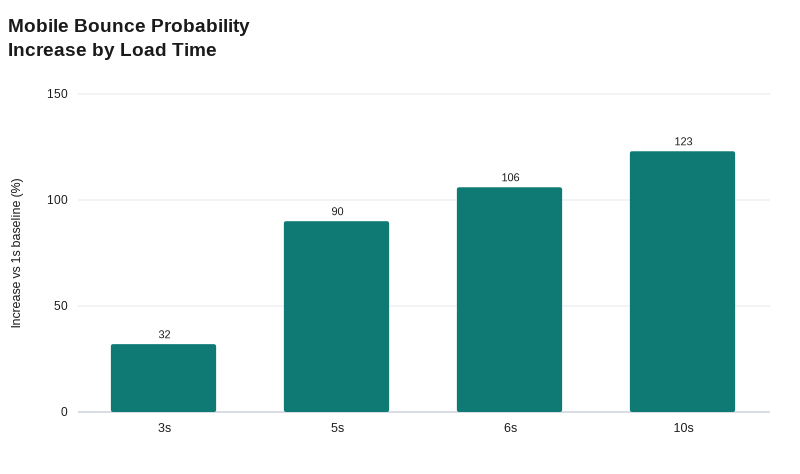
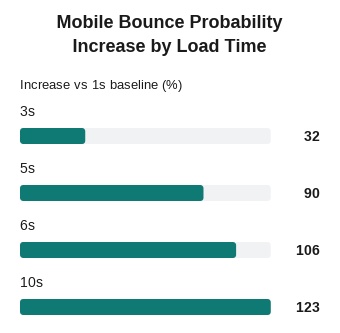
- Bounce probability climbs 32% at 3 seconds, 90% at 5 seconds, 106% at 6 seconds, and 123% at 10 seconds, all measured against a 1-second baseline
- Mobile pages that load 1 second faster see up to a 27% increase in conversion rate
- The average mobile landing page takes 15 seconds to fully load, based on Google’s 2018 analysis of 11 million mobile ad landing pages across 213 countries
- Removing a single field from an online form can lift conversions by up to 50%, according to Formstack’s own conversion research
- Average form conversion rate across industries sits near 3%, per Smart Insights data cited in Formstack’s report
- A dental booking form with more than 3 fields is already working against the visitor before they have typed a name
53% of mobile visitors leave a page that takes longer than three seconds to load. That comes from Google’s own mobile speed research, built on more than 900,000 mobile site records. Most dental practice websites lose bookings before a visitor ever reads a treatment page, sees a trust badge, or reaches a form.
The fix is not a full rebuild. It is a specific set of page elements: form field count, call-to-action placement, load time, and trust signals that work without a testimonial. This guide covers each one, with the exact numbers behind each change, and the AHPRA rules that shape what a dental practice can say while making them.
Why a Fast Page Matters More Than a Pretty One
A dental practice can have the best treatment photography in Perth and still lose most of its mobile traffic before anyone sees it. Google’s mobile speed research found bounce probability rises steeply as load time increases: 32% higher at 3 seconds, 90% higher at 5 seconds, 106% higher at 6 seconds, and 123% higher at 10 seconds, all measured against a 1-second baseline.
| Load Time | Visitor Behaviour |
|---|---|
| 1 second | Baseline |
| 3 seconds | 53% of mobile visits abandoned before the page finishes loading |
| 5 seconds | Bounce probability up 90% vs baseline |
| 6 seconds | Bounce probability up 106% vs baseline |
| 10 seconds | Bounce probability up 123% vs baseline |
The same research found mobile pages that load one second faster see up to a 27% lift in conversion rate. That is not a design preference. It is measurable revenue sitting in image compression settings and third-party embed scripts.
Most dental sites are nowhere close to a 3-second target. Google’s 2018 follow-up analysis of 11 million mobile ad landing pages found the average mobile page takes 15 seconds to fully load, and 70% of the pages studied took more than 5 seconds for above-the-fold content to appear.
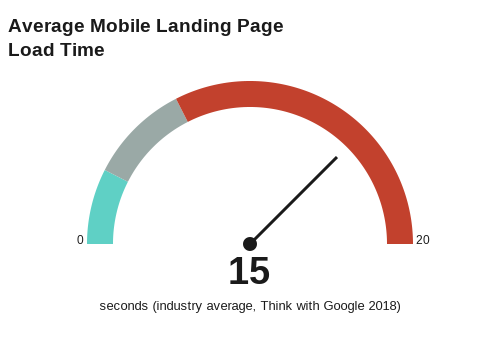
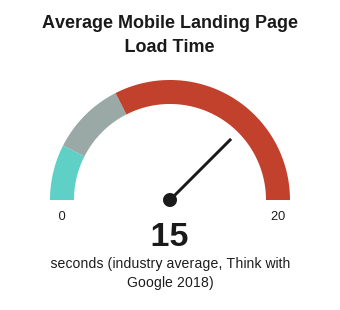
Takeaway: A treatment page that loads in 15 seconds is losing more than half its mobile visitors before they see a booking button, regardless of how good the page looks once it renders.
The Booking Form: Every Field Is a Reason to Leave
Formstack’s own conversion research, drawing on an independent analysis of contact form data, found that removing a single field from a form can lift conversions by up to 50%. Average form conversion across industries sits near 3%, according to Smart Insights data cited in that same report.
Most dental booking forms ask for far more than they need at the enquiry stage: full name, date of birth, Medicare number, preferred treatment, referral source, and a free-text message field. That is a patient intake form, not a booking form. It belongs after the first phone call, not before it.
| Field | Needed at first enquiry? | Notes |
|---|---|---|
| Name | Yes | Single field, first and last combined |
| Phone number | Yes | Primary contact method for follow-up |
| Preferred treatment | Optional | Dropdown, not free text, if included |
| Preferred day or time | Optional | Speeds up the callback, not a hard requirement |
| Date of birth | No | Collect after the first call |
| Medicare or health fund number | No | Collect after the first call |
| Free-text message | No | Adds friction with no matching lift |
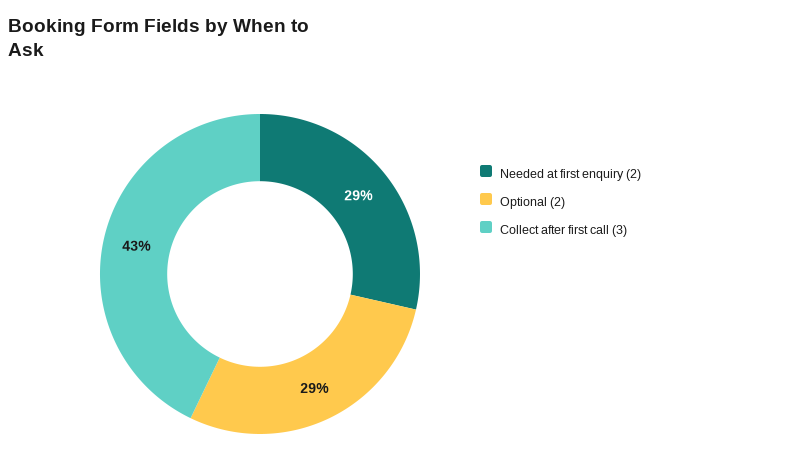
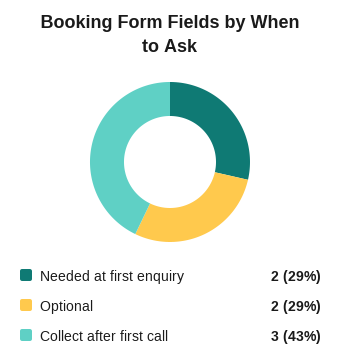
A 2-to-3 field form (name, phone, optional treatment dropdown) covers what a practice actually needs to call a patient back. Everything else can wait until someone has already decided to book.
Takeaway: Every field above 3 is a place a mobile visitor closes the tab instead of finishing. Cut the form to what a receptionist needs to make the first call.
Call-to-Action Placement That Isn’t Guesswork
A booking button buried below three paragraphs of treatment copy does not get clicked, no matter how good the copy is. A practical placement structure for a dental treatment page:
- Primary CTA above the fold. “Request a consultation” or “Check availability”, visible without scrolling on mobile, not “Learn more”
- Sticky mobile CTA bar. A fixed bottom bar with a tap-to-call number and a booking link, present on every scroll position
- Secondary CTA after the treatment explainer. Placed once the visitor has read what the procedure involves, for the reader who needed more information first
- Tertiary CTA in the practitioner section. Direct booking link tied to a named practitioner, not a generic “contact us”
Keep CTA copy compliant while doing this. AHPRA’s advertising rules apply to what a call-to-action can imply as much as what a testimonial can claim. “Book your consultation” is fine. “Guaranteed same-day results” is not. Our breakdown of the current AHPRA advertising rules for cosmetic dentistry covers exactly what CTA and treatment copy can and cannot say.
Takeaway: A visitor should never have to scroll to find the next step, and the copy on that step should never make a claim AHPRA restricts.
Trust Signals That Don’t Need a Testimonial
AHPRA’s rules remove the two trust signals most industries lean on hardest: testimonials and before/after imagery. A dental practice website still needs to answer “can I trust this practice with my teeth?” without either.
Compliant signals that carry that weight:
- A named practitioner page with real qualifications, training dates, and professional memberships, not a stock photo and a job title
- Visible accreditation: ADA membership, AHPRA registration number, facility certifications
- Clinical transparency content that explains what a procedure involves and what to realistically expect, without claiming an outcome
- A clear, honest indication of price range, so a visitor isn’t asked to commit before knowing roughly what a consultation costs
Getting this right on an existing site starts with knowing what is already non-compliant. Talk to ClinicCode about reviewing specific pages against the current rules before a practice spends on a rebuild.
Takeaway: Compliant trust signals do the work testimonials used to do. They just need to be built deliberately, not bolted on as an afterthought.
Putting It Together: A Target Structure
Here is what a page built against every figure above looks like compared to a typical dental site.
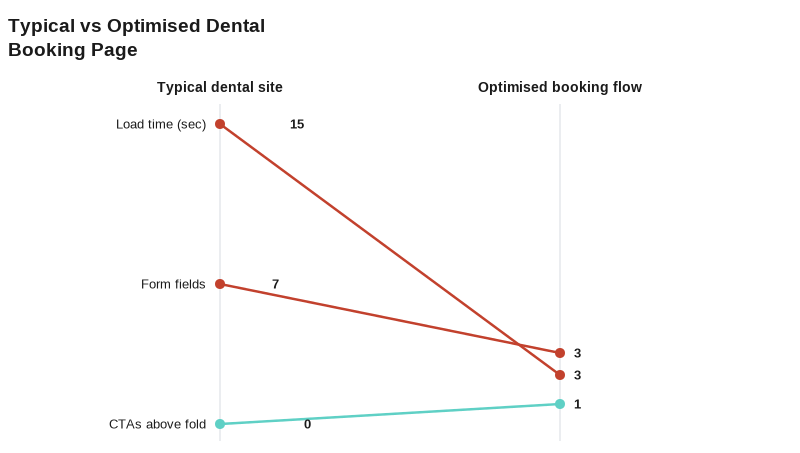
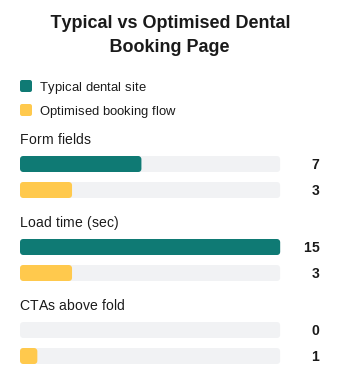
Three fields instead of seven or more. A load time under 3 seconds instead of an industry average of 15. A visible call-to-action above the fold instead of none. None of this requires new treatments, new pricing, or new claims. It requires rebuilding the page around what the data says a visitor actually does before they leave.
Takeaway: The gap between a typical dental site and an optimised one is not content. It is structure, and structure is fixable without touching a single clinical claim.
Build It Once, Correctly
A compliant, conversion-built cosmetic clinic website applies every element in this guide from the first build: a 3-second load target, a 2-to-3 field booking form, CTA placement tested against mobile scroll behaviour, and trust signals that never need a testimonial to work.
Talk to us about your practice’s website
Sources and References
- Think with Google - “The Need for Mobile Speed” (Google/SOASTA, 2016): analysis of 900,000+ mobile site records, 53% mobile bounce rate past 3 seconds, bounce probability increases of 32% (3s), 90% (5s), 106% (6s) and 123% (10s) against a 1-second baseline, and up to 27% conversion lift per 1 second of load time saved
- Think with Google - “Find Out How You Stack Up to New Industry Benchmarks for Mobile Page Speed” (Daniel An, 2018): analysis of 11 million mobile ad landing pages across 213 countries, 15-second average full load time, 70% of pages over 5 seconds to above-the-fold content
- Formstack - “How to Improve Form Conversion Rates When Nothing Else Works”: average form conversion rate near 3% (via Smart Insights), and up to 50% conversion lift from removing a single form field
Related reading:
- Cosmetic Clinic Website Booking Conversion Australia: the AHPRA-compliant trust signal stack in full, with clinic-specific conversion benchmarks
- 4.3% Conversion Rate: Dental Website Benchmark: where dental sits against other healthcare subcategories, channel by channel
- AHPRA Advertising Rules for Cosmetic Dentistry: the current rules governing what a dental practice can publish
- Call me back: a page-by-page compliance review before a rebuild
Vikas Thakur
Founder, Perth. 16 years of experience from working at TPG, iiNet and Monadelphous, now helping Australian clinics keep their websites, ads and online presence AHPRA compliant.