Why Google Ads Judges Your Whole Site, Not One Page
Google’s healthcare and medicines policy reviews an advertiser’s whole site, not just the linked landing page, so a cosmetic clinic or dental practice mixing advertisable and non-advertisable services on one domain risks the entire Ads account.
 Vikas Thakur Founder, Perth 13 min read Fact checked
As at 15 August 2026, Google Ads reviews an advertiser’s healthcare content across the whole site, not only the page a specific ad points to, under its healthcare and medicines policy. In Australia, that matters because prescription-only cosmetic treatments, chiefly anti-wrinkle injections and most dermal fillers, cannot be advertised to consumers at all, while non-prescription treatments such as chemical peels, laser and teeth whitening can. A clinic or dental practice running both service types on one domain needs a landing page structure that keeps the two apart, or it risks the whole Ads account over a page the ad itself never linked to.
Here’s the part most agencies skip. A page doesn’t need to be the ad’s destination to sink the account. It just needs to be reachable from it.
Key takeaways
- Google’s healthcare and medicines policy evaluates “the content of your ads, site, or app,” not just the linked landing page (checked 15 August 2026)
- Its prescription drug services policy extends that review to “landing pages that link or refer to” restricted content
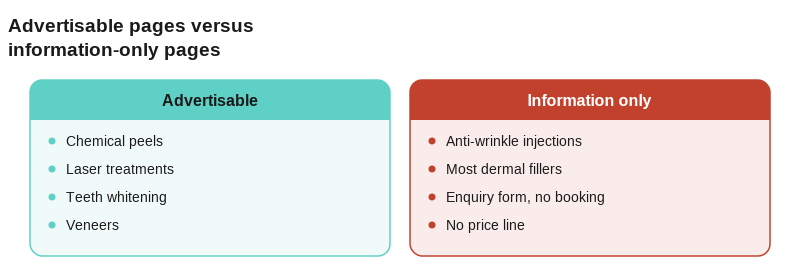
- Anti-wrinkle injections and most dermal fillers use Schedule 4 prescription medicines, which cannot be advertised directly to consumers under Australia’s therapeutic goods rules
- Chemical peels, laser treatments, teeth whitening and veneers are not prescription medicines and can generally be advertised
- Australian healthcare advertisers, as a category, must obtain Google’s healthcare advertiser certification regardless of which specific services they promote
- AHPRA’s guidelines for non-surgical cosmetic procedures, in effect since 2 September 2025, cover every registered health practitioner except medical practitioners, who stay under the Medical Board’s 2023 guidelines, which changes which rulebook applies to the practitioner delivering a restricted treatment
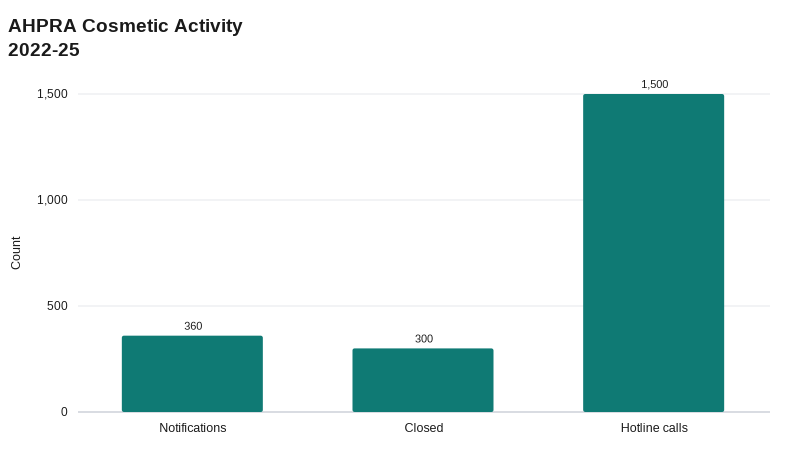
- AHPRA investigated about 360 notifications about non-surgical cosmetic procedures between September 2022 and March 2025, with around 300 closed and over 1,500 calls to its cosmetic surgery hotline in the same window
- No single page fixes this. URL structure, internal links, the sitemap and the Final URL field in Google Ads all need to agree with each other
What Google’s Policy Actually Says
Google’s healthcare and medicines policy requires healthcare advertisers to follow local law and, for most categories, to hold Google certification before serving ads. Reported in Google’s own words, the policy determines whether an advertiser is promoting a restricted service “based on a number of factors, such as the content of your ads, site, or app, as well as the products or services that you offer.” That phrasing is the whole point of this post. Google is not promising to check only the URL in your ad’s Final URL field.
Its companion prescription drug services policy is more explicit still. It states Google looks at “landing pages that link or refer to content that in any way appears to be or to facilitate” the online prescribing, dispensing or sale of prescription drugs. A page can fail this review without a single restricted word on it, purely because it links onward to a page that does.
Underneath both platform policies sits an Australian legal fact that predates Google Ads by decades. Part 5-1 of the Therapeutic Goods Act 1989 (Cth) restricts advertising of therapeutic goods, and Schedule 4 prescription medicines cannot be advertised directly to the public in Australia. Botulinum toxin products and most injectable dermal fillers are Schedule 4. A chemical peel, a laser treatment or a teeth whitening product generally isn’t. That distinction, not Google’s policy wording, is what decides which of your treatment pages can carry an ad at all. Google’s rule then decides how the rest of your site needs to be built around that split.
Takeaway: Google reads your site the way a regulator would, as one connected thing, so a compliant landing page next to a non-compliant one is not two separate risks. It’s one.
What That Means for the Build
Treat “advertisable” and “non-advertisable” as a routing decision, not a copywriting one. The fix lives in your site’s structure, not just its sentences.
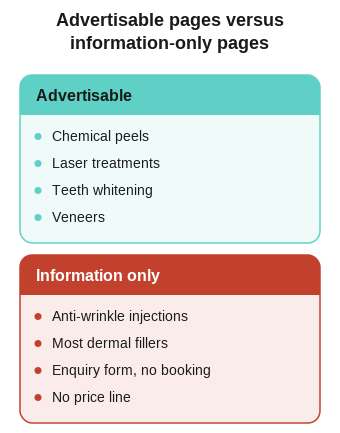
Split the URL structure by advertising status, not by treatment type. A path like /treatments/skin-laser/ and /treatments/anti-wrinkle/ sitting side by side in the same folder tells Google nothing about which one an ad campaign feeds. Group advertisable pages under a path you control end to end, for example /treatments/ for pages that will carry paid traffic, and keep prescription-only or informational-only content under a clearly separate path, for example /procedures/ or /information/, that no ad campaign ever targets.
Audit every internal link on an advertisable page. A “Related treatments” module, a footer sitemap block, or a blog post’s inline link can quietly connect a compliant landing page to a non-advertisable one. Since Google’s own wording covers pages that “link or refer to” restricted content, that module is a policy surface, not just a UX feature. Pull the rendered HTML of each ad-driving page and check every <a href> against your list of non-advertisable URLs.
Match your Google Ads Final URL field to the routing split exactly. Every ad group’s Final URL should resolve inside the advertisable path only. If a campaign uses Dynamic Search Ads or an automated feed, exclude the non-advertisable path from the page feed or via a URL exclusion rule in campaign settings, because DSA crawls your whole site by default and will happily generate an ad for a page you never meant to advertise.
Segment your XML sitemap. A single sitemap.xml that lists every page, advertisable and not, gives Google’s crawler and its Ads policy reviewer the same undifferentiated view of your site. Splitting into sitemap-treatments.xml (advertisable) and sitemap-information.xml (everything else), both referenced from a sitemap index, keeps the distinction visible in the one place a bot actually reads it.
Keep the CTA different on non-advertisable pages. A booking widget or “Book Now” button on an anti-wrinkle information page reads as promotion, not information, no matter what the URL structure says. Use an enquiry form or “discuss at consultation” prompt instead, and keep pricing off the page entirely, since price display is itself a form of promotion under the same logic.
Point your Google Business Profile website field at the advertisable root, not a specific treatment page. GBP’s website link gets crawled as part of the same whole-site review Google describes above. Linking it at your homepage or a clean services hub, rather than a single treatment URL, avoids tying the whole profile to one page’s compliance status.
Takeaway: The fix touches URL routing, internal linking, the sitemap and the Ads account settings together, and skipping any one of them reopens the gap the others just closed.
Decision Matrix: What Can Carry an Ad
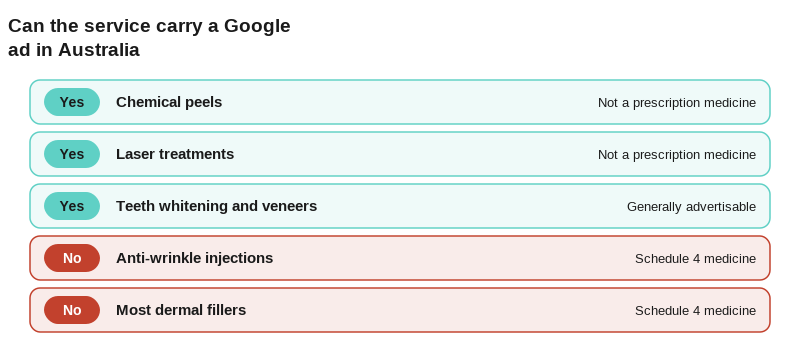
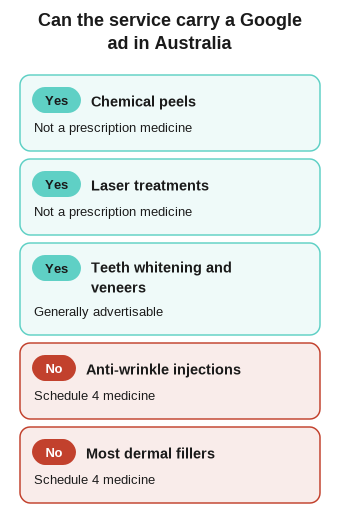
| Service | Prescription medicine involved | Advertisable in Australia | Where it belongs on-site |
|---|---|---|---|
| Chemical peel | No | Yes | Advertisable path, ad-eligible |
| Laser hair removal or skin treatment | No | Yes | Advertisable path, ad-eligible |
| Teeth whitening (professional application) | No | Yes | Advertisable path, ad-eligible |
| Porcelain veneers | No | Yes | Advertisable path, ad-eligible |
| Anti-wrinkle injections | Yes, Schedule 4 | No | Information-only path, not linked from ad pages |
| Dermal filler (most products) | Yes, Schedule 4 | No | Information-only path, not linked from ad pages |
Worked Example: Cosmetic Clinic
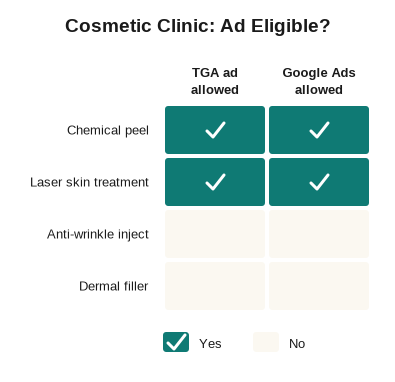
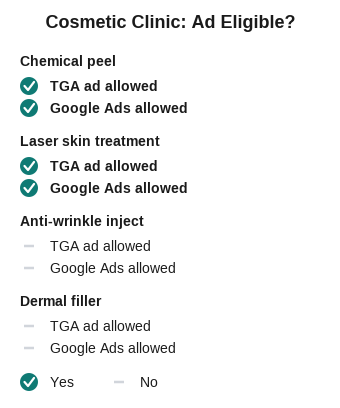
Imagine a Perth cosmetic clinic offering chemical peels, laser skin treatments and anti-wrinkle injections from the same site. The peels and laser pages sit at /treatments/chemical-peel/ and /treatments/laser-skin/, both targeted by a live Google Ads campaign. The injectable page originally sat at /treatments/anti-wrinkle/, in the same folder, with a “Book your consultation” button and a “From $XXX” price line, and it was linked from both other treatment pages under a “You might also like” module.
The fix moves it to /information/anti-wrinkle-injections/, strips the price line and the booking widget in favour of an enquiry form, and removes it from the “You might also like” module on both advertised pages. The sitemap splits into two files. The Google Ads campaign’s Final URL list is checked to confirm nothing points into /information/, and a URL exclusion rule is added at the campaign level as a second safeguard against a future Dynamic Search Ads expansion pulling it in automatically.
Worked Example: Cosmetic Dentistry
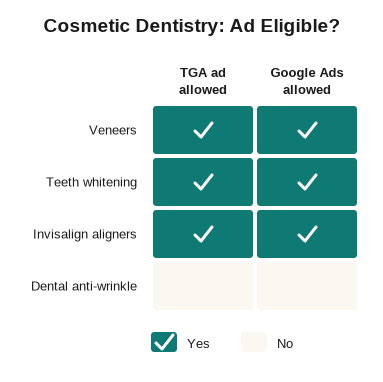
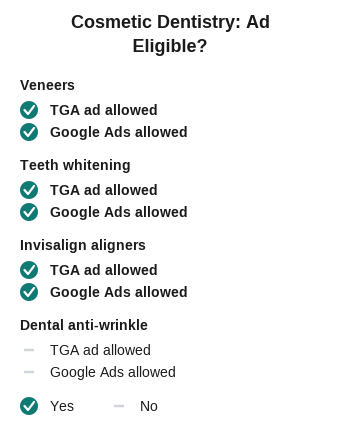
A dental practice offering veneers, teeth whitening and Invisalign alongside anti-wrinkle injections for jaw tension faces the identical structural problem, just with a dental catalogue. Veneers, whitening and clear aligners are the advertisable services. The anti-wrinkle service uses the same Schedule 4 medicine a cosmetic clinic would use, so it carries the same restriction regardless of who is holding the syringe.
The practice’s main navigation originally listed all four services under one “Cosmetic Services” dropdown, which put the injectable page one click from every advertised page on the site. The fix keeps veneers, whitening and Invisalign in that dropdown, moves the anti-wrinkle page to a separate “Patient Information” section of the nav that is never linked from the treatment pages themselves, and rewrites the injectable page’s meta title and H1 to drop any price or “book now” framing.
Because the September 2025 AHPRA guidelines for non-surgical cosmetic procedures apply to every registered health practitioner except medical practitioners, a dentist delivering this treatment sits under a different guideline set than a cosmetic doctor would, on top of the Google Ads and TGA layers above. The build fix for the site is the same either way. Which specific advertising guideline governs the wording on that information page depends on who is registered to deliver the treatment.
What to Check on Your Own Site
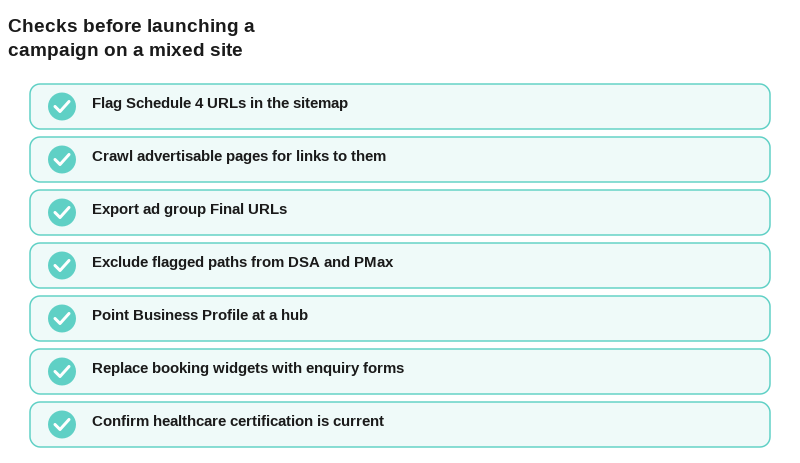
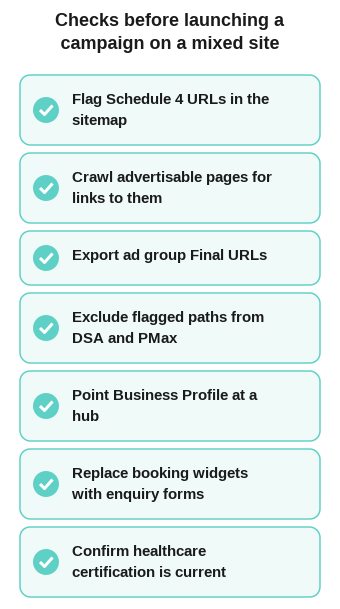
- Pull your live XML sitemap and list every URL under a treatment or procedure path. Flag any that involve a Schedule 4 prescription medicine.
- Crawl every advertisable page’s rendered HTML and list every outbound
<a href>. Confirm none point to a flagged URL from the step above. - Open Google Ads, export every ad group’s Final URL, and confirm none resolve to a flagged URL.
- Check whether any campaign uses Dynamic Search Ads or a Performance Max asset group with automated URL expansion, and add a page feed exclusion or URL exclusion rule for the flagged paths.
- Check your Google Business Profile website field. Point it at a services hub or homepage rather than a single treatment page.
- Check flagged pages for a booking widget, a price line, or a “book now” CTA, and replace with an enquiry form.
- Confirm your healthcare advertiser certification with Google is current, since Australian healthcare advertisers need it as a category regardless of which specific pages are running.
Where This Gets Teeth
ClinicCode has not found a published Google Ads suspension case, determination or infringement notice that names an Australian cosmetic clinic or dental practice specifically over this site-structure mechanic, and this post does not claim one exists. What is verifiably real is the regulatory pressure sitting underneath it. The strategy research behind this post’s queue confirms the TGA’s own Compliance Principles 2026 to 2027, published January 2026, name cosmetic injectable advertising as a stated enforcement priority for the full two-year window, and AHPRA’s own published figures put non-surgical cosmetic procedure notifications at around 360 investigated between September 2022 and March 2025. Neither of those is a case study of a Google Ads account being suspended over internal linking, but both confirm the underlying rule, that prescription cosmetic treatments can’t be advertised, is one regulators are actively resourced to enforce, not a theoretical reading of a policy page.
Where This Gets Hard
Google’s own language, “content that in any way appears to be or to facilitate,” is broad by design and reviewed case by case, with no published checklist of what triggers a manual flag versus an automated one. A page that passes review today can be caught in a policy sweep next quarter without any change on your end. Dynamic Search Ads and Performance Max asset groups compound this, since both can auto-generate ads from crawled content, and a page feed exclusion needs to be actively maintained as new pages are published, not set once and forgotten.
The practitioner-registration layer adds a second kind of complexity that sits outside Google’s policy entirely. Whether AHPRA’s September 2025 guidelines or the Medical Board’s 2023 guidelines apply to a given page’s wording depends on who is registered to deliver the treatment described on it, and that can differ page by page inside the same practice if both a nurse and a cosmetic doctor perform the same procedure. The regulator says what the advertising rule is; the build consequence is a routing and linking structure that keeps restricted content off ad-eligible pages; whether a specific page’s wording satisfies AHPRA, the Medical Board or the Therapeutic Goods Advertising Code is a question for your medical defence organisation or your lawyer.
Status Line
Google’s healthcare and medicines policy and prescription drug services policy are live, currently enforced platform rules as at 15 August 2026, not Australian law, and Google can change them without notice. The underlying prohibition on advertising Schedule 4 prescription medicines to consumers under the Therapeutic Goods Act 1989 (Cth) has been in force for years and is not new. AHPRA’s guidelines for registered health practitioners who perform non-surgical cosmetic procedures have been in effect since 2 September 2025.
Frequently Asked Questions
Can Google suspend my whole Ads account over one non-compliant page?
Yes. Google’s healthcare and medicines policy says it evaluates advertisers on the content of your ads, site or app as a whole, and its prescription drug services policy extends that review to landing pages that link to or refer to restricted content, so one non-compliant page can affect account-level standing.
Which cosmetic treatments can I advertise in Australia?
Treatments that are not prescription-only medicines, such as chemical peels, laser treatments, teeth whitening and veneers, can generally be advertised. Treatments delivered using a Schedule 4 prescription medicine, chiefly anti-wrinkle injections and most dermal fillers, cannot be advertised directly to consumers.
Do advertisable and non-advertisable service pages need separate domains?
No. A subdirectory on the same domain is usually enough, provided the pages that feed Google Ads campaigns do not link to, or embed content from, the non-advertisable pages, since Google’s policy language treats linked and referenced content as part of the same review.
Need a hand with your website?
If you want a second pair of eyes on how this applies to your own site, request a callback and we will talk it through.
Sources and References
- Google Ads, “Healthcare and medicines” policy: support.google.com/adspolicy/answer/176031. Date checked: 15 August 2026.
- Google Ads, “Prescription drug services” policy: support.google.com/adspolicy/answer/15598647. Date checked: 15 August 2026.
- Therapeutic Goods Act 1989 (Cth), Part 5-1, Federal Register of Legislation: legislation.gov.au/C2004A03952. Date checked: 15 August 2026.
- AHPRA, “New guidelines for cosmetic procedures”: ahpra.gov.au. Date checked: 15 August 2026.
- AHPRA, cosmetic guideline announcement and notification volumes: ahpra.gov.au. Date checked: 15 August 2026.
Last reviewed: 15 August 2026.
If your site mixes advertisable and restricted treatments on one domain and you want a second set of eyes on the routing before your next campaign launch, get in touch or see how ClinicCode approaches website builds for regulated Australian clinics.
Vikas Thakur
Founder, Perth. 16 years of experience from working at TPG, iiNet and Monadelphous, now helping Australian clinics keep their websites, ads and online presence AHPRA compliant.